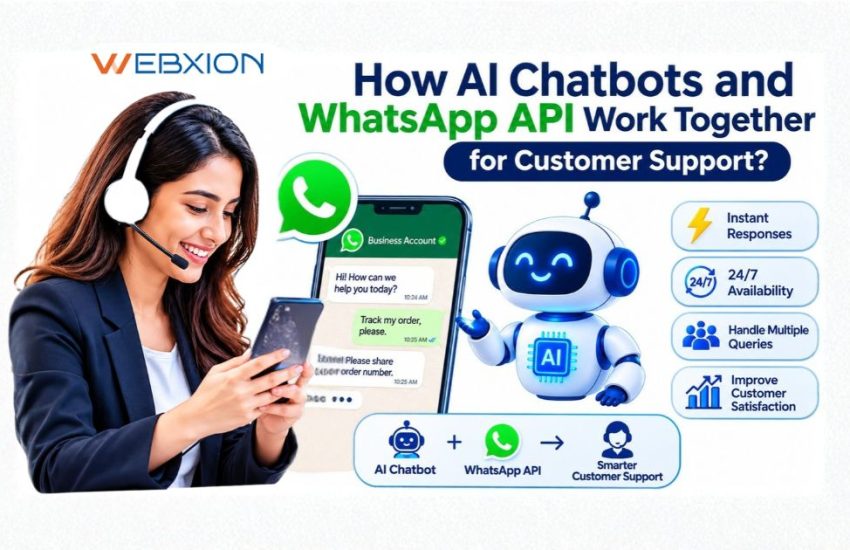
Summary – AI chatbots and the WhatsApp Business API work together to help businesses automate customer support, answer common questions, manage enquiries, and connect customers with human agents when needed. The WhatsApp API enables business messaging, while the AI chatbot understands customer queries and generates relevant responses. When integrated with a CRM or helpdesk, this combination can also organize conversations, track support requests, and improve response times.
For businesses in India, including e-commerce companies, educational institutions, financial service providers, healthcare organizations, and service businesses, WhatsApp AI chatbot integration offers a practical way to handle customer conversations at scale without relying entirely on manual support teams.
What Is the WhatsApp Business API for Customer Support?
The WhatsApp Business API, part of the WhatsApp Business Platform, allows businesses to connect WhatsApp messaging with customer support software, chatbots, CRM systems, and other business applications.
Unlike the standard WhatsApp Business App, which is designed primarily for smaller-scale business communication, API-based solutions support more advanced integrations and automated workflows.
Businesses can use the WhatsApp Business API to:
- Send customer service replies and relevant notifications.
- Connect WhatsApp conversations with AI chatbots.
- Route enquiries to the appropriate support team.
- Integrate customer messages with CRM and helpdesk platforms.
- Manage approved business-initiated message templates.
- Track conversations and support activity through connected systems.
For example, an online retailer can use WhatsApp to answer questions about product availability, order status, returns, and delivery updates. Instead of requiring an agent to respond to every routine enquiry, an integrated chatbot can handle supported requests automatically.
What Is an AI Chatbot, and How Does It Improve Customer Service?
An AI chatbot is software that interprets customer messages and responds using its configured instructions, business information, and connected systems. Depending on its design, it may use natural language processing, large language models, retrieval-based knowledge systems, and predefined workflows to understand what a customer needs.
Unlike a basic rule-based chatbot that follows fixed buttons and menus, an AI-powered chatbot can often understand different ways of asking the same question.
For instance, customers might ask, “Where is my order?”, “Has my parcel shipped?” or “Can you check my delivery?” An appropriately configured chatbot can recognize that these messages relate to order tracking.
However, an AI chatbot is only as reliable as its knowledge sources, integrations, instructions, and safeguards. It should not invent order details, promise unavailable services, or make unsupported claims. When it cannot confidently resolve a request, it should offer an appropriate fallback or transfer the conversation to a human agent.
How Do AI Chatbots and WhatsApp API Work Together?
AI chatbots and WhatsApp API work together by combining WhatsApp’s business messaging capabilities with automated conversation handling. The API connects customer messages to the chatbot, which interprets the request, retrieves relevant information, and sends an appropriate response through WhatsApp.
Here is how a typical interaction works.
1. A Customer Sends a WhatsApp Message
A customer contacts a business to ask about a product, appointment, payment, delivery, or support issue. The WhatsApp Business Platform receives the message and makes it available to the connected application through the configured integration.
2. The AI Chatbot Understands the Request
The chatbot identifies the customer’s intent and determines the next action. A simple question may require information from a knowledge base, while an order enquiry may require an authenticated lookup in the company’s order management system.
3. The Chatbot Retrieves Relevant Information
The chatbot uses approved business information or connected systems to prepare its response. For example, it may retrieve a return policy from the company’s knowledge base or request a delivery update from an integrated order management system.
Access to personal or account-specific information should follow suitable authentication and permission controls.
4. The Response Is Sent Through WhatsApp
After generating or selecting the appropriate answer, the integration sends the response through the WhatsApp messaging channel. The customer can continue the conversation without switching to another platform.
5. Complex Queries Reach a Human Agent
If the customer raises a complaint, requests a person, or needs help beyond the chatbot’s capabilities, the system can route the conversation to a support agent. Depending on the integration, the agent may receive the conversation history and relevant customer details.
6. The Conversation Is Recorded
If a CRM or helpdesk is connected, the system can record conversation details, create support tickets, update customer records, or trigger follow-up tasks.
Businesses planning this workflow can explore WebXion’s guide to WhatsApp API chatbot integration for a more detailed explanation of how the technologies connect.
What Are the Benefits of Integrating AI Chatbots with WhatsApp API?
Combining AI chatbots with WhatsApp Business API can improve customer support by reducing repetitive manual work and making assistance more accessible.
Provide Customer Support Around the Clock
An automated chatbot can answer supported questions outside regular business hours, including evenings, weekends, and holidays. This is useful for Indian businesses serving customers across different cities and time zones.
For example, an online education provider can automatically answer questions about course schedules, admission requirements, and application procedures even when its office is closed.
Reduce Waiting Times
Customers do not always need to wait for an available agent to receive basic information. A chatbot can respond to routine enquiries immediately when the necessary information and integrations are available.
This allows support teams to spend more time resolving complex issues instead of repeatedly answering the same questions.
Handle More Conversations at Scale
During product launches, festive sales, admission periods, or promotional campaigns, customer enquiries can increase quickly. An appropriately designed chatbot can manage multiple conversations concurrently, subject to platform, infrastructure, and integration limits.
Deliver More Consistent Responses
A chatbot connected to an approved knowledge base can provide consistent answers about business hours, service availability, policies, and common procedures. Regular knowledge-base reviews help keep those answers accurate.
Reduce Repetitive Support Work
Automating routine questions, appointment reminders, and supported status checks can reduce manual workload. The actual savings depend on the number of automated conversations, chatbot quality, integration costs, and the complexity of customer requests.
For additional ideas, read about how AI chatbots improve WhatsApp customer experiences through conversational automation.
What Customer Support Tasks Can WhatsApp AI Chatbots Automate?
The most effective automation starts with frequent, clearly defined customer requests.
Common use cases include:
- Frequently asked questions: Answer queries about business hours, pricing, service availability, return policies, and documentation.
- Order and delivery updates: Retrieve order status, shipping information, or delivery progress from connected systems.
- Appointments and bookings: Help customers check availability, schedule appointments, and receive reminders.
- Product and service enquiries: Explain features, compare options, and direct customers to relevant information.
- Complaint registration: Collect issue details, create a support ticket, and route the complaint to the appropriate team.
- Payment and billing assistance: Explain supported billing processes or direct customers to secure payment and account channels.
- Lead qualification: Ask relevant questions and route qualified enquiries to sales or customer support teams.
For example, an educational institution in Pune can use a WhatsApp chatbot to answer admission questions, share course details, collect enquiry information, and direct applicants to an admissions counsellor when personalized guidance is needed.
The important point is to automate tasks that the system can handle reliably rather than attempting to replace every human interaction.
How Does WhatsApp API Integration with CRM Improve Customer Support?
Integrating WhatsApp Business API with a customer relationship management (CRM) system helps businesses connect messaging conversations with customer records and support workflows.
To understand how customer conversations, contact records, and automated workflows connect, explore the WhatsApp CRM integration process.
Depending on the CRM and integration, the system may:
- Store customer enquiry details and conversation history.
- Create and assign support tickets.
- Track unresolved requests and follow-up activities.
- Route conversations to sales, billing, technical support, or other departments.
- Help agents understand earlier interactions before replying.
- Generate reports on enquiry volumes, response times, and resolution activity.
Consider a customer who reports a faulty product through WhatsApp. The chatbot collects the order reference and problem description, then creates a support ticket in the connected helpdesk. A human agent can review the details, investigate the issue, and update the customer without asking them to repeat the entire conversation.
Businesses should confirm which CRM fields, ticketing functions, and reporting features are actually supported before selecting an integration.
How Does an AI Chatbot Handover to a Human Support Agent Work?
AI chatbot handover, also called human escalation or live-agent transfer, allows a customer to move from automated assistance to a support representative when necessary.
Understanding the balance between automation and personal assistance is important, so businesses should consider how AI chatbots vs human support affects customer experience, response quality, and issue resolution.
A reliable handover process should:
- Recognize when a query is too complex or falls outside the chatbot’s knowledge.
- Respect requests to speak with a human agent.
- Transfer the conversation to the appropriate department.
- Share relevant conversation history and collected details where permitted.
- Inform the customer about the next step if an agent is not immediately available.
For instance, a chatbot may answer a question about a refund policy but transfer the conversation when a customer disputes a refund or reports an unusual payment issue.
Human escalation is especially important for sensitive complaints, account-specific decisions, and situations where incorrect automated advice could cause harm. Businesses should test these scenarios before deploying the chatbot.
What WhatsApp Business API Rules Should Businesses Know?
WhatsApp chatbot integration must follow applicable WhatsApp Business Platform policies and relevant privacy and communication requirements.
Businesses should pay particular attention to:
- Customer consent: Obtain appropriate permission before sending business-initiated messages and respect opt-out requests.
- Customer service window: Understand WhatsApp’s customer service messaging window and the applicable rules for replying outside it.
- Message templates: Use approved templates where required for business-initiated messages outside the customer service window.
- Data protection: Limit access to personal information, secure connected systems, and establish appropriate data retention practices.
- Message quality: Keep communication relevant, useful, and consistent with platform policies.
- Indian compliance: Assess applicable Indian data protection, consumer protection, and sector-specific requirements based on the business and its use case.
Platform policies and pricing can change, so businesses should verify the latest requirements before implementation. An API provider or chatbot vendor can assist with setup, but the business remains responsible for ensuring its communication practices are appropriate.
How Can You Integrate an AI Chatbot with WhatsApp Business API?
A successful integration starts with a clear support objective rather than simply deploying a chatbot.
Step 1: Identify Repetitive Customer Questions
Review support conversations to find common queries, such as delivery updates, business hours, booking requests, or product information. Start with a small group of high-volume, low-risk tasks.
Step 2: Set Up WhatsApp Business Platform Access
Choose an appropriate WhatsApp Business Platform setup and confirm the requirements for business verification, phone number configuration, messaging, and provider integration.
Step 3: Connect the Chatbot to Business Information
Prepare accurate FAQs, product details, service policies, and approved support instructions. Define how the chatbot should respond when information is missing or uncertain.
Step 4: Integrate CRM and Support Systems
Connect the relevant systems if the workflow requires customer lookups, ticket creation, appointment booking, or order tracking. Configure permissions and authentication for sensitive operations.
Step 5: Configure Replies and Human Handover
Set up conversation flows, fallback responses, escalation triggers, and department routing. Clearly define which actions the chatbot can perform and which require human approval.
Step 6: Test Before Launch
Test common questions, unclear messages, incorrect inputs, complaints, unsupported requests, and human handover. Confirm that customer data is handled appropriately and that responses match the latest business information.
Step 7: Monitor and Improve
Track useful metrics such as first-response time, resolution rate, escalation rate, customer satisfaction, and unanswered questions. Review failed conversations regularly and update the chatbot’s knowledge and workflows.
How Much Does WhatsApp AI Chatbot Integration Cost?
The cost of integrating an AI chatbot with WhatsApp API depends on the business’s requirements, messaging volume, software choices, and integration complexity.
Common cost factors include:
- WhatsApp messaging charges applicable to the account and message category.
- Chatbot platform subscriptions or AI usage fees.
- CRM, helpdesk, and third-party integration costs.
- Custom workflow development and deployment.
- Ongoing maintenance, monitoring, and technical support.
A business that needs automated FAQs may require a simpler setup than an enterprise that needs multilingual conversations, order lookups, CRM synchronization, and advanced reporting.
Before choosing a provider, request a clear breakdown of setup charges, recurring fees, messaging costs, included features, and support arrangements.
How Do You Choose the Right WhatsApp API Provider for AI Chatbot Integration?
Choose a provider based on its ability to support your complete customer service workflow, not just its advertised chatbot features.
Before selecting a provider, compare its automation capabilities, CRM compatibility, integration support, and scalability. This guide explains WhatsApp API provider selection and the features businesses should evaluate.
Check whether it offers:
- Access to the official WhatsApp Business Platform.
- AI chatbot customization and knowledge-base support.
- CRM and helpdesk integration.
- Human-agent handover and shared inbox capabilities.
- Reporting, scalability, and technical assistance.
- Transparent pricing and guidance on platform requirements.
Also ask for a demonstration using a realistic customer support scenario. A practical demo can reveal whether the chatbot retrieves accurate information, handles unclear questions, and escalates conversations correctly.
Improve Customer Support with WebXion
AI chatbots and WhatsApp Business API can help businesses automate customer support, manage customer enquiries, and deliver faster responses. WebXion provides communication solutions that help businesses connect with customers through AI ChatBots Services, WhatsApp Business API Provider solutions, and RCS Business Messaging Services.
Beyond WhatsApp automation, businesses can explore Bulk SMS Services, OTP SMS Services, Transactional SMS Services, SMS Notification Services, SMPP Server Service, and Voice OTP Delivery Services for reliable business messaging. WebXion also offers Bulk Voice Calling Services, Outbound Voice Calls Services, IVR Calls Services, Missed Call Services, and AI Voice Bot Services, along with assistance for DLT registration.
Whether you want to automate customer support, improve customer engagement, or build an integrated communication platform, Contact WebXion to discuss your requirements, explore suitable solutions, and find the right approach for your business.
Frequently Asked Questions
How do AI chatbots and WhatsApp API work together?
WhatsApp API connects customer messages to a business application, while the AI chatbot interprets the questions and generates relevant responses. Connected CRM or helpdesk systems can provide customer information and manage support tasks.
Can an AI chatbot automatically reply to WhatsApp messages?
Yes. An integrated AI chatbot can automatically answer supported customer queries, share approved information, and trigger configured workflows. Its capabilities depend on the chatbot, integrations, and WhatsApp messaging rules.
Is WhatsApp Business API required for AI chatbot integration?
For business-grade integration with the WhatsApp Business Platform, API access is generally used to connect messaging with chatbot software and business systems. The exact setup depends on the selected solution and its supported capabilities.
Can a WhatsApp AI chatbot provide 24/7 customer support?
Yes. Automated replies can operate around the clock, provided the chatbot infrastructure and integrations are available. Complex issues may still require human assistance during staffed hours.
Can WhatsApp AI chatbots integrate with CRM software?
Yes. Depending on compatibility, an integration can synchronize customer information, create support tickets, track enquiries, and support follow-ups between WhatsApp conversations and a CRM.
Can a WhatsApp chatbot transfer customers to a human agent?
Yes. A properly configured chatbot can escalate complex queries, complaints, or explicit requests for human assistance to an available agent or the relevant support team.
Is WhatsApp AI chatbot integration suitable for small businesses in India?
Yes. Small businesses can begin with common FAQs, appointment bookings, and enquiry management, then expand to CRM integration and more advanced automation as their support requirements grow.