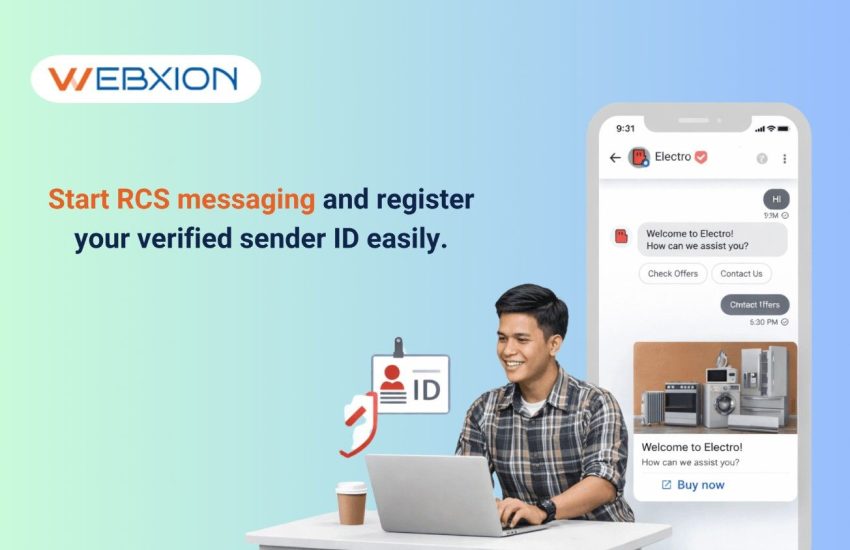
Summary – If you’re looking to upgrade your business messaging, RCS (Rich Communication Services) is the way to go. Unlike traditional SMS, RCS allows your company to send interactive messages with images, videos, buttons, and even carousels—all under your verified sender ID. Customers instantly recognize your brand with a logo and verification badge, boosting trust and engagement.
Businesses across India and worldwide are using RCS Business Messaging (RBM) for transactional notifications, promotional campaigns, appointment reminders, and customer support chats. By integrating RCS with platforms like WhatsApp Business, AI chatbots, SMS notifications, and outbound voice services, companies can create a seamless, multi-channel experience.
Getting started is simpler than it sounds: select a reliable RCS messaging provider, set up your business agent profile, get verified, integrate APIs, and start sending rich, interactive messages that engage customers and drive results.
Messaging is no longer just about sending plain text. Today, customers expect interactive, personalized, and visually engaging messages that feel trustworthy and convenient. That’s where RCS messaging for businesses comes in.
With RCS, your company can send rich media messages like product catalogs, booking confirmations, payment links, and even map directions, all inside the messaging app. And the best part? Your brand shows up clearly with a verified sender ID, making every interaction feel authentic.
Think of it this way: an e-commerce company in Mumbai can send a carousel of recommended products with “Buy Now” or “Track Order” buttons, while a bank can send a fraud alert with actionable options like “Approve Transaction” or “Report Issue.” This is the kind of engagement that plain SMS just can’t deliver.
Companies that adopt RCS Business Messaging early enjoy higher open rates, click-throughs, and customer trust. By combining it with WhatsApp Business Platform services, AI chatbots, SMS notifications, and outbound voice campaigns, you can create a full-fledged communication strategy that keeps customers informed, engaged, and ready to take action.
Whether your goal is marketing campaigns, transactional notifications, or interactive customer support, RCS messaging gives your business a modern, professional, and highly effective way to communicate.
What is RCS Messaging?
RCS (Rich Communication Services) is an advanced messaging technology designed to replace traditional SMS with a much richer and more interactive communication experience.
Instead of sending simple text messages, businesses can send branded conversations that include multimedia content, interactive buttons, and verified business profiles.
The biggest difference is that RCS messages feel more like chatting in a messaging app rather than receiving a regular SMS.
When a customer receives an RCS message from a business, they typically see:
- The brand name instead of a phone number
- The official company logo
- A verification badge
- Interactive options such as buttons or menus
- Images, videos, or product cards
This instantly makes the conversation feel more trustworthy and engaging.
Some of the key features businesses use with RCS messaging include:
- Rich media such as images, GIFs, and videos
- Quick reply buttons that customers can tap instantly
- Suggested actions like calling, booking, or navigating
- Product carousels and cards
- Message delivery and read receipts
- Fully branded sender profiles
For marketing teams and customer support departments, this creates a messaging experience that feels closer to a mini mobile app inside the messaging window.
Benefits of RCS Messaging for Businesses
When businesses start using RCS Business Messaging, they often notice immediate improvements in customer engagement and campaign performance.
Because RCS messages look like verified conversations from a real brand, customers are far more likely to open them, interact with them, and trust them.
For example, many retail companies that switched from SMS to RCS for promotional campaigns have reported much stronger engagement rates.
Here are some of the biggest benefits businesses see:
Higher engagement rates
- Interactive buttons make it easier for customers to respond
- Visual content grabs attention faster than plain text
Verified brand identity
- Customers see the official business logo
- Verified sender status builds trust instantly
Better customer experience
- Messages feel more like conversations
- Customers can interact directly within the chat
Stronger marketing results
- Product images help increase conversions
- Interactive CTAs drive website visits
More informative communication
- Send order confirmations with product images
- Provide travel details with maps or QR codes
Industries such as e-commerce, banking, airlines, travel, retail, and logistics are already using RCS messaging to improve customer engagement and communication.
What is a Verified Sender ID in RCS?
A Verified Sender ID in RCS is essentially a branded profile that confirms the authenticity of a business sending messages.
When a company completes the verification process, its messages appear with a brand name, company logo, and verification badge in the messaging interface.
This helps customers instantly recognize that the message is coming from a legitimate brand.
For example, if a travel company sends an RCS booking confirmation, the customer will see:
- The official company name
- The brand logo
- A verification badge showing it’s authentic
This makes a huge difference in building trust because customers are much less likely to ignore or doubt the message.
A verified sender profile usually includes:
- Business name
- Brand logo
- Company description
- Website link
- Customer support details
For businesses running marketing campaigns or customer notifications, a verified sender identity significantly increases open rates and customer confidence.
Requirements to Start RCS Messaging for Your Business
Before businesses can start using RCS messaging, there are a few basic requirements to meet. These requirements are mainly designed to ensure that messaging remains secure, trustworthy, and compliant with policies.
Most companies preparing to launch RCS messaging will need the following:
Business Requirements
- A registered business or legal company entity
- A working business website
- A privacy policy and terms of service
- Clear brand identity including logo and description
Technical Requirements
- Access to an RCS messaging platform
- Messaging API integration
- Campaign or notification templates
Compliance Requirements
- Customer opt-in consent
- Responsible messaging practices
- Compliance with messaging policies
Many businesses choose to work with an RCS messaging provider who helps manage these technical steps and simplifies the setup process.
Step-by-Step Guide to Get Started with RCS Messaging
Setting up RCS messaging might sound complicated at first, but in reality the process is quite structured and manageable. Most companies follow a straightforward series of steps to get everything ready.
Let’s walk through how businesses typically get started.
Step 1: Choose an RCS Business Messaging Provider
The first step is selecting a trusted RCS messaging platform or RBM provider. This provider connects your business to the RCS infrastructure and manages message delivery, APIs, and verification.
When evaluating providers, businesses usually look at factors such as:
- Delivery reliability
- API capabilities
- Campaign analytics and reporting
- Automation features
- Compliance support
Choosing the right provider can make the entire setup process faster and smoother.
Step 2: Create Your RCS Business Agent
After selecting a provider, the next step is setting up your RCS Business Agent profile. This agent represents your brand within the messaging system.
During this setup, businesses provide details like:
- Company name
- Brand logo
- Business description
- Official website
- Customer support contact
These details help create the branded messaging profile customers will see.
Step 3: Apply for Verified Sender ID
Once the business agent profile is ready, companies apply for RCS sender verification.
The verification process usually involves submitting:
- Business registration information
- Website verification
- Brand assets such as logo
- Compliance confirmations
After approval, the business receives verified sender status, which appears in the messaging interface.
Step 4: Configure Messaging Capabilities
After verification, businesses can start designing their messaging experiences.
RCS allows companies to create interactive messages such as:
- Product carousels
- Promotional banners
- Appointment reminders
- Customer support conversations
- Payment or booking links
These features allow businesses to design messaging flows tailored to specific customer journeys.
Step 5: Integrate RCS Messaging API
To automate messaging, businesses integrate the RCS messaging API with their existing platforms like CRM systems or marketing automation tools.
This allows companies to automatically send messages based on customer actions.
Common automation use cases include:
- Order confirmations
- Delivery updates
- Appointment reminders
- Customer service responses
- Promotional campaigns
Automation ensures customers receive the right message at the right time.
Step 6: Test Your RCS Messaging Campaign
Before launching campaigns publicly, businesses usually perform testing to make sure everything works smoothly.
Testing typically includes:
- Message display verification
- Button functionality testing
- Media loading checks
- Delivery tracking validation
These tests ensure customers have a smooth and consistent messaging experience.
Step 7: Launch Your First RCS Campaign
Once testing is complete, businesses can start sending their first RCS campaigns.
Common campaign examples include:
- Product promotions
- Personalized offers
- Customer onboarding messages
- Delivery tracking updates
- Event reminders
Many companies also combine RCS with other messaging channels to create a multi-channel communication strategy.
Best Practices for Successful RCS Messaging Campaigns
Using RCS effectively requires thoughtful planning. Businesses that succeed with RCS usually focus on creating messages that are helpful, engaging, and easy for customers to interact with.
Here are some practical strategies companies follow:
Make messages visually appealing
- Use high-quality product images
- Keep designs clean and simple
Use interactive buttons
- “Shop Now”
- “Track Order”
- “Contact Support”
Personalize communication
- Address customers by name
- Send relevant offers based on behavior
Respect customer preferences
- Only message users who opted in
- Provide easy opt-out options
Monitor campaign performance
- Track open rates
- Measure engagement metrics
These practices help businesses build trust while improving campaign results.
RCS Messaging vs SMS vs WhatsApp Business
When planning messaging strategies, businesses often compare different communication channels.
Each platform offers unique benefits depending on the use case.
SMS Messaging
- Works on all mobile devices
- Ideal for basic notifications
- Limited to text content
RCS Messaging
- Supports rich media and interactive features
- Displays verified brand identity
- Offers stronger engagement potential
WhatsApp Business Messaging
- Popular messaging platform worldwide
- Supports automation and chatbots
- Requires users to have the app installed
Many companies combine these platforms to create a broader communication strategy.
Build Stronger Customer Connections with Modern Messaging Technology
RCS messaging is transforming how businesses communicate with customers. Instead of sending simple text alerts, companies can now deliver interactive, branded, and engaging messages that customers are more likely to open and respond to. From product promotions and order updates to appointment reminders and customer support interactions, RCS Business Messaging helps brands create more meaningful and professional communication experiences.
The real impact comes when RCS is used as part of a multi-channel messaging strategy. Many businesses now combine WhatsApp Business Platform services, RCS Business Messaging services, SMS Notification services, Outbound Voice Calls services, Missed Call Services, and AI ChatBots services to reach customers across multiple touchpoints. This approach improves engagement, strengthens brand trust, and ensures faster, more personalized communication.
If you’re planning to launch RCS messaging or build a complete omnichannel communication strategy, the right technology partner can make the process simple and scalable. Connect with Webxion to explore advanced messaging solutions that help your business engage customers more effectively, streamline communication, and grow with modern messaging technology.
Frequently Asked Questions
1. What is RCS Business Messaging and how is it different from SMS?
RCS Business Messaging (RBM) is an advanced messaging solution that allows businesses to send interactive and branded messages directly to customers. Unlike traditional SMS, RCS supports images, videos, carousels, suggested replies, and action buttons, creating a more engaging messaging experience.
Businesses can also display their brand name, logo, and verified sender ID, which helps build trust and improves customer engagement.
RCS messaging is commonly used for:
- Promotional marketing campaigns
- Transactional notifications and order updates
- Customer service conversations
- Appointment reminders and booking confirmations
Many businesses combine RCS messaging with WhatsApp Business messaging, SMS notifications, and AI chatbot automation to improve communication and customer engagement.
2. How can my company register a Verified Sender ID for RCS messaging?
To get a Verified Sender ID for RCS messaging, businesses need to register through an RCS Business Messaging provider. The provider helps create your business agent profile and handles the verification process.
The process usually includes:
- Submitting business registration details
- Providing a company website and brand logo
- Verifying business identity and compliance
Once approved, your messages will show your brand name, logo, and verification badge, which increases trust and message open rates.
3. Is RCS messaging better than SMS for businesses?
RCS messaging offers more advanced features compared to SMS, especially for interactive marketing and customer engagement.
Key differences include:
- SMS Messaging
- Plain text messages
- Limited interaction
- RCS Business Messaging
- Rich media like images and videos
- Interactive buttons and replies
- Verified brand identity
Many companies use RCS messaging along with SMS and WhatsApp Business services to create a stronger multi-channel communication strategy.
4. Do customers need to install an app to receive RCS messages?
No, most customers do not need to install a separate app. Modern Android smartphones already support RCS messaging through their default messaging apps.
Customers receiving RCS messages can:
- See verified brand profiles and logos
- Interact with buttons and quick replies
- View images, videos, and product cards
If RCS is not supported on a device, the message can automatically fall back to standard SMS delivery.
5. Which industries benefit the most from RCS Business Messaging?
RCS messaging works well for industries that rely on customer communication and engagement.
Common industries using RCS include:
- E-commerce and retail
- Banking and financial services
- Travel and airlines
- Logistics and delivery companies
- Customer support services